How Enterprise Application Development Services Support Digital Transformation
Enterprise application development services give an organization the software it needs to run its core processes, along with the connections that let that software work as one system. The need shows up clearly in a single number. MuleSoft’s 2026 Connectivity Benchmark, a survey of 1,050 IT leaders, found that the average organization manages 957 applications and only 27% of them are connected to each other.
You have probably met this gap in everyday work: a customer record that differs between sales and finance, an approval stuck in someone’s inbox, a report that reflects last month instead of today. When applications sit apart, employees close the gaps by hand, and the whole initiative slows to the pace of a spreadsheet.
Put simply, enterprise application development supports digital transformation by building software around core processes, connecting systems that work alone, replacing legacy applications that limit change, and preparing the data that automation and AI depend on.
Let’s see how it actually works in practice.
Enterprise Application Development Explained
Enterprise application development is the work of designing, building, integrating, modernizing, and maintaining the software that runs an organization’s core processes, from finance and sales to operations, HR, and supply chain.
A consumer app serves individuals who can walk away whenever they like, while an enterprise application serves teams whose daily work depends on it, so it has to be dependable from the first login.
What Makes an Application Enterprise-Grade?
Four qualities set these applications apart from ordinary business software:
- Scale: It keeps performing as users, data, and transactions grow.
- Security and Compliance: Access controls and encryption protect sensitive data, and the system meets the rules the business operates under, such as GDPR for personal data in the EU or HIPAA for health information in the US.
- Reliability: It stays available during working hours and recovers quickly when something fails.
- Role-Based Access: Each person sees and does only what their job requires.
Common Types of Enterprise Applications
Most enterprise software falls into a handful of familiar categories:
| Type | What It Manages |
| ERP (enterprise resource planning) | Finance, procurement, inventory, and production |
| CRM (customer relationship management) | Sales pipeline, customer records, and support |
| HRMS (human resource management system) | Hiring, payroll, attendance, and performance |
| SCM (supply chain management) | Suppliers, logistics, and distribution |
| BI (business intelligence) | Reporting and analysis of business data |
| ECM (enterprise content management) | Documents and records |
Why Digital Transformation Depends on the Software Layer
Digital transformation is the shift from running a business on paper, spreadsheets, and disconnected tools to running it on connected software and shared data. Three things change along the way: how work gets done, how decisions are made, and what customers and employees experience when they deal with the business. And software is the means for all three.
Why Many Programs Fall Short
BCG’s 2020 study of digital transformations found that only about 30% succeed. BCG is clear about why: technology is a challenge, but the people side, meaning organization, operating model, processes, and culture, is usually the deciding factor. Software cannot carry a digital transformation alone. It does decide how much room the rest of the effort has to work with.
The Platform Factor Software Can Fix
BCG identified six factors that separate successful programs from the rest, and one of them sits squarely in software’s territory: a business-led, modular technology and data platform. More than half of the companies in the study struggled with platforms that lacked flexibility, while two out of three successful programs had invested in a modern platform designed around business needs.
Here, “modular” simply means the platform is built from parts that can be changed or added one at a time, so a new idea does not mean rebuilding everything around it. That is the layer enterprise applications sit on, and the next section shows what building it looks like in practice.
Seven Ways Enterprise Application Development Supports Digital Transformation
Enterprise application development turns goals like faster service or one view of the customer into systems people use every day. Here are seven ways it does that.
Connecting Systems That Work in Isolation
Enterprise application development links the systems an organization already runs, so data moves between them without anyone retyping it.
Most organizations run a patchwork of tools, bought at different times for different teams. Each works on its own. None talks to the others. Developers close the gap with integrations, often built on APIs, the agreed channels that let one program request data from another. Update a record in one system, and the others can see the change.
Take a bank onboarding a customer. Identity checks, account setup, and the customer record each sit in a separate tool, so staff copy details from screen to screen, and every copy risks a typo or a delay. Once the systems are connected, the details are entered once and travel on their own.
Automating Manual, Approval-Heavy Work
Custom applications can take over routing, checking, and notifying, so people spend their time on decisions.
Think of an insurer handling a simple claim. Without automation, it waits in a queue while someone checks the policy, confirms the documents, and forwards it for sign-off. A workflow application does the checking itself. Complete claims go straight to the approver. Incomplete ones return to the customer with a clear list of what’s missing.
The same pattern fits any process built on emailed forms, inbox approvals, and hand-updated spreadsheets. The application maps each step, applies the rules, and flags only what needs a person.
Replacing Legacy Software That Limits Change
Modernizing legacy software removes the roadblocks that make every new idea slow and costly.
Legacy software is an older system a business still relies on, usually built on outdated technology. It may run fine. Changing it is the problem. Edits are risky, and the people who understand the code may be few. Even a small request, like adding an online option, can turn into a months-long project.
Modernization moves the function onto a current foundation, and it needn’t happen all at once. Consider a city that issues permits on decades-old software, so residents must queue at an office. It rebuilds the permit module first, launches online applications, and leaves the remaining modules for later while the old system keeps running.
Improving the Employee and Customer Experience
Good applications make daily work simpler for staff and interactions smoother for customers.
Staff who find a tool slow or confusing often work around it, which defeats the purpose of having it. Enterprise mobility solutions address this by putting business apps on phones and tablets, so employees aren’t tied to a desk. Customers get the same benefit through self-service portals and simple apps that answer questions without a phone call.
In a retail chain, a store employee scans a product and instantly sees shelf stock, warehouse stock, and the next delivery date. No trip to the back office. The customer gets an answer on the spot.
Turning Scattered Data Into Real-Time Decisions
Applications that pull data from across the business give leaders a shared, current picture, so decisions rest on today’s figures rather than last month’s report.
Data often sits in pockets: one number in finance, another in operations, a third in a spreadsheet nobody owns. Someone has to stitch these together by hand, and the report is already dated when it lands. Enterprise applications can gather those sources into one live dashboard, so everyone sees the same figures and problems surface while there’s still time to act.
Picture a logistics dispatcher watching vehicle locations, warehouse loading, and delivery status on one screen. A late truck is flagged early, a nearby driver is rerouted, and the customer hears about it before they have to ask.
Preparing Systems for AI and Agents
An AI tool is only useful if it can reach the right data and act on it safely, so enterprise application development builds the foundation that makes AI integration practical.
A model that can’t read your records or trigger an action stays a demo. AI integration means building those links: clean data going in, and controlled ways for the AI to act on it. This extends to AI agents, software that carries out multi-step tasks on its own, like gathering information, drafting a reply, and passing it for approval. Deciding what an agent may do, and who checks the result, is part of the build.
A hospital, for instance, wants an AI assistant to help book appointments. It needs clinic calendars and patient contact details, under strict privacy controls. With connected, well-organized systems, it can offer open slots and book the visit while sensitive records stay protected. Without them, it has nothing dependable to work from.
Keeping Applications Improving After Launch
Ongoing updates keep an application useful as regulations, products, and customer habits change.
An application left untouched slowly drifts away from how the business actually works. Enterprise application development services usually cover this phase too: monitoring, security updates, performance tuning, and releases shaped by how people use the software. Small, steady changes are easier to manage than one large rebuild down the road.
In a manufacturer’s maintenance-tracking app, floor staff reports that one screen takes too many taps, and a quick update fixes it. When a new safety rule calls for an extra checklist, it ships in a single release instead of a replacement.
Ready to Build or Modernize Your Enterprise Application?
Whether you need to connect existing systems, replace legacy software, or build a new enterprise application, our team can help you find the right approach.
Build, Buy or Modernize: Choosing the Right Route
The right route depends on how unusual your processes are and how much your current systems can still do.
When a Packaged Platform Is Enough
If your process looks like everyone else’s, such as payroll or standard accounting, a packaged platform is usually the faster and cheaper route to start. The work then lies in configuring it well and connecting it to the rest of your systems.
When Custom Development Pays Off
Custom software earns its cost where the process itself gives you an edge, or where no packaged product fits how you actually work. A custom software development company can build exactly that, and you keep control of what changes next.
When Modernizing Is the Better Route
When the current system still does its job but has grown hard to maintain or connect, modernizing it is often better than starting over. There are four common paths, from lightest to heaviest: rehost it on new infrastructure, replatform it onto a newer foundation with minor changes, refactor its code for easier change, or rebuild it entirely.
Decision Table
Use this as a first filter, then test the answer against your own situation.
| Factor | Packaged Platform | Custom Development | Modernization |
| Best when the need is | Common across industries | Specific to how you operate | Met today, but on aging technology |
| Time to start | Fastest | Slowest | Depends on the route chosen |
| Fit with your process | You adapt to the product | Built around your process | Keeps the current fit |
| Control of the roadmap | Mostly the vendor’s | Yours | Yours |
| Main risk | Workarounds pile up | Scope growth and upkeep | Hidden complexity in old code |
How an Enterprise Application Project Moves From Idea to Launch
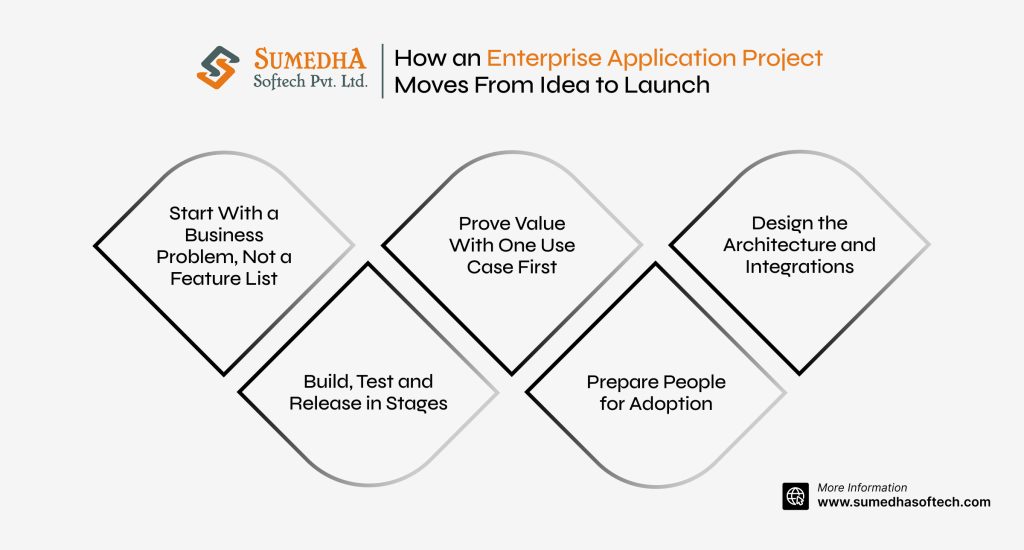
Most well-run enterprise application projects move through the same five stages.
Start With a Business Problem, Not a Feature List
Feature lists feel productive, but they hide the question that matters: what is actually going wrong? Say it in plain words. Approvals sit in inboxes for days. Two teams keep different versions of the same customer record. A problem you can state in one sentence is a project you can finish.
Prove Value With One Use Case First
Resist the urge to build everything at once. BCG found that successful programs often start with one or two “lighthouse” use cases: a minimum viable version, improved until it works, then scaled. Pick a process that is painful, self-contained, and visible, like expense approvals or order tracking. A working result earns trust, and it shows what the bigger program will need.
Design the Architecture and Integrations
Before anyone writes code, settle how the application will connect to the systems around it. Which data has to move, and where? How will APIs carry it? Will the design still hold once the next few features arrive? Answering these early saves the team from rebuilding what already works.
Build, Test and Release in Stages
Build in short cycles that each end with something people can actually try. Test how the application handles realistic load and how it exchanges data with other systems, as well as how each screen works. Then release gradually, to a small group first and everyone after, so any problems stay small.
Prepare People for Adoption
Even a well-built application fails if people avoid it. Bring future users in while it is being built, so it matches how they really work. Train them before launch, and give each team one person to ask in the first few weeks. Adoption belongs in the plan from day one.
How to Measure Whether It Is Working
A launch date is a milestone. Whether the project worked shows up in the numbers afterward.
Choosing KPIs That Match the Goal
Choose the metric that would show the problem you set out to solve getting smaller, and skip the ones that only look impressive. A handful of measures is enough:
| If the goal is | Track |
| Efficiency | Time to complete a process, hours spent on manual steps, error and rework rates |
| Experience | Time employees need to finish a task, customer satisfaction, share of customers who resolve issues without help |
| Agility | Time from request to release for a new feature or change |
| Cost | Spend on retired systems and licenses, cost per transaction |
| Adoption | Share of the process now running through the application, active users against expected users |
Baselines and Review Cadence
Write down today’s numbers before the build starts. Without a starting point, an improvement is just an opinion. Then review on a fixed schedule, say monthly during rollout and quarterly once things settle, and give every measure an owner, so a slipping number reaches someone who can act on it.
Frequently Asked Questions
Is an enterprise application the same as enterprise software?
Often, yes. People use the terms interchangeably, but enterprise software is the broader label, while enterprise application usually points to one specific system, such as an ERP or a CRM. Enterprise software development services cover building, connecting, and maintaining all of them.
What is the difference between digitization and digital transformation?
Digitization converts something analog into digital form, like scanning paper invoices. Digital transformation is broader: it uses digital data and connected software to rethink the process the invoice belongs to, so approvals, payments, and reporting work differently end to end.
Do we need to replace our ERP or CRM to begin?
Often not. A common starting point is connecting existing systems through APIs and building new applications around them for the gaps. Replacement becomes worth considering when a system can no longer be maintained, connected, or extended at a reasonable cost.
Is low-code enough for enterprise applications?
Low-code works well for simple internal tools and quick workflow apps. It gets harder to rely on when you need complex integrations, heavy customization, strict performance, or specific compliance controls. A common split is low-code for lightweight needs and custom development for core systems.
Can mid-sized companies benefit from enterprise application development?
Yes. The scale differs, but disconnected systems, manual approvals, and slow reporting show up in mid-sized companies too. A focused enterprise app development project, such as connecting sales and finance, is a practical place to start.
Where to Begin
Start with a list. Write down every application your teams rely on, who owns it, what data it holds, and which other systems it connects to. Then mark the spots where people copy information by hand or wait on one another. Those spots show where a first project would help most, and the list itself gives any development team a clear picture to work from.
When those gaps point to a larger software need, Sumedha Softech’s enterprise software development services can help you build new applications, modernize legacy systems, or connect software that currently works in isolation. The goal is to create technology that fits the way your business operates and can evolve as those needs change.
If you’re planning an enterprise application project, talk to our team to explore the right approach for your business.