
AI Integration in Business: How to Integrate AI Into Existing Systems
Most companies don’t fail at AI because the technology doesn’t work. They fail because nobody worked out how to connect it to the systems the business already runs on. It’s not a small gap either; McKinsey’s 2026 State of AI survey found that nearly nine in ten organizations now use AI in at least one business function, but only 44% of them have actually gotten it to scale across the enterprise. That gap is AI integration, and it’s usually the part that companies skipped in the hurry to adopt the latest tool.
Well, this isn’t another surface-level explainer on why AI matters. It’s a practical look at how AI integration actually works inside a business that already has systems, data, and people in place, what to check before you start, the steps that make it stick, and where most teams get it wrong.
What Is AI Integration in Business?
AI integration is the process of connecting AI tools and models into the software a business already runs, its CRM, internal tools, customer support setup, and whatever’s already in place. So, AI can easily become a part of the work that actually gets done instead of sitting on the sidelines as an app that nobody opens.
That difference matters more than it sounds like it should. A lot of businesses use AI in the sense that someone on the team has ChatGPT open in another tab. That’s not integration. Integration means the AI is integrated into your actual workflow, where it reads your data, acts inside your existing tools, and shows up where the work already happens instead of asking people to go find it.
It’s less about adding a new piece of software and more about making your existing system a little smarter at the specific jobs they were already doing.
Where AI Actually Fits Into Your Existing Systems
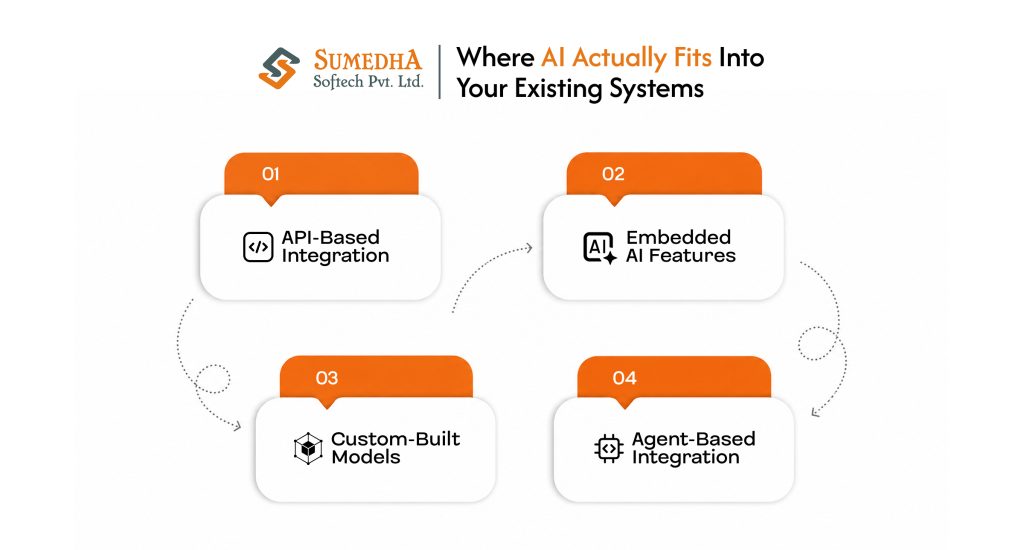
Before we move directly to steps, first let’s know what integrating AI can actually look like, because it’s not one thing. Most businesses usually end up choosing between four paths, and picking the wrong one is where a lot of budget gets wasted.
API-Based Integration
You connect to an existing AI model through its API and plug it into a tool you already use, like adding AI-generated summaries inside your CRM. This is usually the fastest and budget-friendly route, and it’s what most AI integration services actually build for small and mid-sized teams.
Embedded AI Features
Tools like Notion, Salesforce, or your helpdesk software already ship with AI built in. Here, integration is closer to configuration than development; you’re switching a feature on rather than building anything.
Custom-Built Models
Trained or fine-tuned on your own data. This is where custom AI solutions development comes in, and it only makes sense when your use case is specific enough that off-the-shelf AI can’t handle it well.
Agent-Based Integration
AI doesn’t just answer questions, but it also takes actions across your systems on its own, pulling data, updating records, triggering workflows. This is the space generative AI development has pushed into over the past couple of years, and it’s usually the most complex path, so it’s rarely where a business should start.
Before You Integrate: What to Check First
Jumping into AI implementation without checking these first is how most integration projects end up costing more and delivering less than expected. None of this takes long to assess, but skipping it is the most common reason projects stall halfway through.
Is Your Data Actually Usable?
AI is only as good as the data it’s working with. But if your customer records are scattered across different tools and half of them are outdated, that’s the first problem to fix, not the AI model.
Can Your Current Systems Even Connect?
Some older or heavily customized software doesn’t have the APIs or access points AI tools need to plug in. It’s better to check this before you commit to a timeline, not after.
Does Your Team Have the Skills to Support This?
You don’t need an in-house AI team to get started, but you’ll need someone to own the integration once it’s live, monitor it, and adjust it as things change.
Is There One Clear Use Case, or Just a General Idea?
“We want AI” isn’t a use case. We want AI to cut response time on support tickets.” The clearer the target, the easier the entire project gets.
What’s the Actual Budget for This?
It’s not just the build cost, but it’s also about what it takes to maintain and improve it afterward. A lot of businesses budget for the launch and forget the six months after it.
How to Integrate AI Into Existing Systems: Step by Step
This is the part that actually matters, the steps that turn a plan into something running inside your business. Skipping a single step here can show up later as a bigger problem.
Step 1 – Define the Problem, Not the Technology
Start with the actual bottleneck, not the AI tool you want to try. Here, “reduce ticket response time by 30%” is a target you can build toward; “add AI to support” is not.
Step 2 – Audit the Systems You’re Connecting To
Map out what data lives where, which tools have APIs, and which ones don’t. This is also where you find out early if a system needs an upgrade before AI can even reach it.
Step 3 – Choose the Right Integration Path
Go back to the four paths from earlier and pick the one that actually fits your use case and budget, not the one that sounds most impressive. Most businesses get more value from a simple API-based setup than a custom model they don’t need yet.
Step 4 – Pick the Right Partner or Team
Whether you’re building in-house or bringing in AI implementation services, this is the point where technical fit matters more than a sales pitch. Ask for examples of systems similar to yours, not just a list of capabilities.
Step 5 – Build Access and Security from the Start
Decide who and what has access to which data before the AI goes live, not after. Bolting on permissions later almost always means redoing work you already did.
Step 6 – Run a Small Pilot Before a Full Rollout
Test the integration on one team or one workflow first. This is where you catch the gaps a full rollout would have made expensive to fix.
Step 7 – Monitor, Adjust, and Then Scale
Once the pilot proves the value, expand it. AI systems drift over time, so this isn’t a one-time launch; it needs regular checking even after it’s working well.
Common Integration Mistakes & How You Can Avoid Them
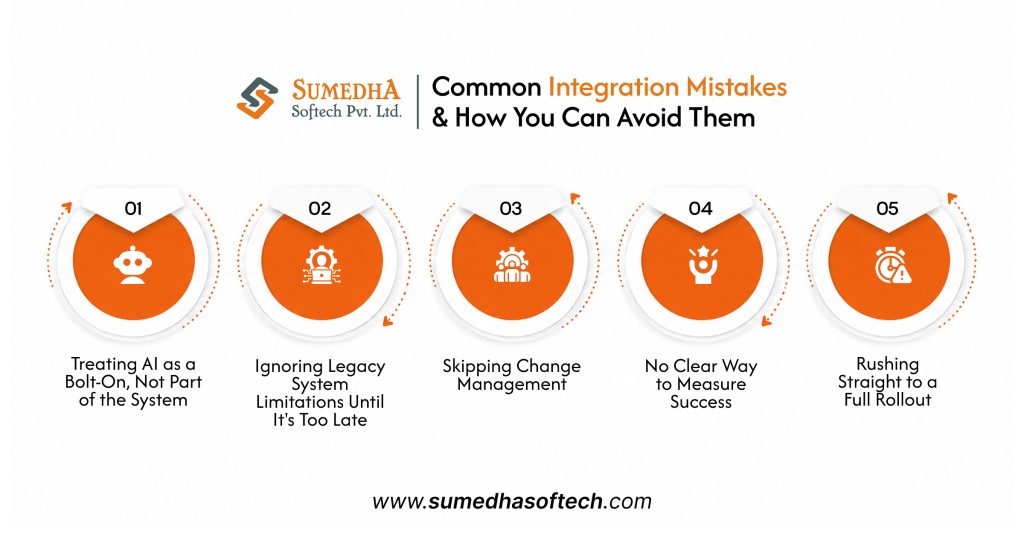
Most AI implementation efforts don’t fail loudly; they fail quietly. They keep on running, but they never actually deliver the value they were supposed to, until someone finally asks why the investment isn’t showing up anywhere. Here are the mistakes behind most of those situations.
Treating AI as a Bolt-On, Not Part of the System
Adding AI as a separate tool nobody’s workflow actually touches is the fastest way to waste a budget. If it’s not built into where the work already happens, people simply won’t use it.
Ignoring Legacy System Limitations Until It’s Too Late
Discovering halfway through that your core system can’t support the integration is one of the most common and expensive mistakes. This should be caught in the audit step, not during the build.
Skipping Change Management
The technology can work perfectly, and the project can still fail if the team using it wasn’t trained or brought into the process early. People adopt tools they understand, not the ones that were dropped on them.
No Clear Way to Measure Success
Without a defined metric from day one, there’s no way to know if the integration is actually working or just running. Decide what working looks like before the launch.
Rushing Straight to a Full Rollout
Skipping the pilot phase means every mistake shows up at full scale instead of in a controlled test. It’s a shortcut that almost always costs more time than it saves.
Can AI Work With Legacy Systems?
Yes, in most cases, though it usually needs a middle layer to make the connection work. Commonly, legacy systems weren’t built with AI in mind, so integration often happens through APIs, middleware, or a data layer that sits between the old system and the new AI tool, rather than a direct plug-in.
The real limitation isn’t whether AI can work with legacy systems; it’s how much custom work that connection takes. A system with no API at all will need more effort than one that just has an outdated one. This is exactly why the systems audit earlier in this post matters so much; it tells you which kind of legacy system you’re actually dealing with before you commit to a timeline or a budget.
Cost, Timeline, and What Determines ROI
There is no single number that fits every business here, and any AI integration solutions provider who quotes one without asking about your systems first is guessing. That said, a few factors consistently decide where you land on the cost and timeline scale.
What Actually Drives the Cost
The integration path you choose matters most. A simple API-based setup connecting one tool to an existing system can be done in weeks. A custom-built model trained on your own data, or an agent-based setup acting across multiple systems, takes considerably longer and costs more, mainly because of the data work and testing involved, not the AI itself.
What a Realistic Timeline Looks Like
A focused, single-use case integration typically runs anywhere from four to twelve weeks, from the systems audit through a working pilot. Anything promising a full AI transformation in a week or two is either oversimplifying the scope or skipping the testing that actually makes it reliable.
What Actually Determines ROI
ROI comes down to how clearly the use case was defined back in step one. A well-scoped integration solving one real bottleneck almost always shows measurable value faster than a broad rollout trying to do everything at once. The businesses that see the clearest returns are usually the ones that started small and expanded only after the first integration proved itself.
Conclusion
AI integration isn’t about adding one more tool to an already crowded stack. Done right, it becomes part of how the business already runs, quietly making the systems you depend on a little sharper at what they were built to do.
The businesses that get real value from this aren’t the ones that moved fastest. They’re the ones that assessed their systems honestly, started with one clear use case, and built it properly before expanding.
If you’re weighing where to start, Sumedha Softech works with businesses across industries on exactly this kind of integration work. We offer custom AI solutions development that connect properly and hand back full code and IP ownership when the work is done. If you want a second opinion on your systems before you commit to a path, that’s a conversation worth having early, not after the budget’s already spent.
Frequently Asked Questions
1. Do small businesses need a dedicated AI team to integrate AI?
Not really. Most small and mid-sized businesses get this done through an experienced partner or a small in-house setup, nothing close to a full AI department. That kind of team only starts to make sense once you’re juggling several integrations at once.
2. Does AI integration mean replacing our current software?
Not in most cases, and honestly, it shouldn’t. The whole point is connecting to what you already have and making it work smarter, not tearing it out and starting over.
3. How long does a typical AI integration take?
It depends on the use case, but for one clearly defined problem, four to twelve weeks is a realistic window from audit to a working pilot. Anything faster usually means something got skipped.
4. Who owns the data once AI is integrated into our systems?
You should, full stop. If a provider can’t give you a straight answer on data ownership before the project starts, it’s worth pausing.
5. Can AI integration fail even if the technology works fine?
It happens more often than people expect. Most of the time, it’s not the AI that failed; it’s a use case that was never clearly defined, or a team that never got brought into the process.