
Enterprise Mobile App Development: A Practical Guide for Business Leaders
If your teams still depend on paperwork, long email chains, or phone calls to get routine work done, enterprise mobile app development is probably on your radar. It simply means building mobile apps for use inside a business, so people can approve requests, track deliveries, or update customer records right from their phone, wherever they happen to be working.
The tricky part is that building the app is only half the job. Plenty of apps are delivered on time and still go unused, either because they don’t match how people actually work, don’t connect with the systems the company already has, or never got IT’s approval.
This guide is meant to help you avoid that. It covers what to decide before development begins, what it costs, how to keep the app secure, and how to get your teams using it after launch.
What Is Enterprise Mobile App Development, and Where Does It Help?
Enterprise app development is the work of building software that a business uses to run its own operations. The mobile side focuses on apps for phones and tablets, and these usually connect to tools the company already depends on, like its CRM, ERP, or HR system. That way, someone on a shop floor or in a client’s office sees the same up-to-date information they’d see at a desk.
How Is It Different from a Consumer App?
Put simply, a consumer app is built for the public, and people download it because they want to. An enterprise app is built for a defined group, such as your technicians or your sales team, and each person sees only what their role allows. It also has to follow company rules on security, like single sign-on and device controls, and it has to keep working for years as your processes change.
That’s why success looks different too. A consumer app is judged by downloads, but an enterprise app is judged by the time saved, fewer errors, and whether people use it every day.
Common Types of Enterprise Apps
Most businesses end up with a mix of these:
- Employee apps let office and hybrid staff handle leave, approvals, and expenses from their phones instead of chasing email chains.
- Field and frontline apps help technicians, sales reps, and warehouse teams update jobs, fill in checklists, and capture proof of work on site, even when the signal drops.
- Customer apps let clients place orders, book services, and get support without calling.
- Partner and vendor apps keep distributors and suppliers in the loop on orders, stock, and invoices.
- Management dashboards give leaders live numbers and quick approvals from anywhere.
Most companies start with the one where paperwork or delays cost the most, then build outward from there.
Three Decisions to Make Before You Build
It’s tempting to start with features. But three earlier decisions shape the whole project, and they’re far cheaper to get right now than to fix after launch.
1. Who Owns the App, and What Does Success Look Like?
Every enterprise app needs one person who is accountable for it, ideally a business leader rather than someone from IT. That person sets priorities, settles disagreements between teams, and cares whether people are still using the app six months later. Without an owner, apps tend to drift. Features pile up, nobody pushes adoption, and the project gets judged only on whether it launched.
Pair the owner with a few measurable goals before development starts, such as cutting approval time from two days to a few hours, or ending the double entry of data in the field. Those numbers also help the team decide what to build first.
2. Custom, Low-Code, or Off-the-Shelf?
There are plenty of enterprise app development solutions on the market, but nearly all of them fall into three groups:
- Off-the-shelf products are ready-made and configured to your needs. They’re the fastest route and work well when your process is fairly standard. The trade-off is that you adapt to the product, not the other way around.
- Low-code platforms let you assemble apps from building blocks. They suit simple internal tools like forms, checklists, and approvals, but they can struggle with complex integrations and may tie you to one vendor.
- Custom apps are built around how your business actually works. Custom software development solutions cost more and take longer, but they make sense when the app is central to daily operations or must connect deeply with your existing systems.
A simple rule to follow. If a ready-made product covers most of your process, buy it. If the need is small and internal, go low-code. And if the app sits at the heart of how you work, build custom.
3. Native, Cross-Platform, or PWA?
This decides how the app is built for phones.
- Native apps are written separately for iPhone and Android. They give the best user experience and grant full access to device features, but you maintain two codebases.
- Cross-platform apps share one codebase across both, using tools like Flutter or React Native.
- PWAs run in the browser and need no app store, but they can’t use every device feature.
For most enterprise apps, cross-platform is the right default, since it usually cuts build and upkeep effort while still giving people a good experience. Go native only if you depend on heavy hardware use, such as specialized Bluetooth devices or very demanding graphics.
What a Good Enterprise App Needs
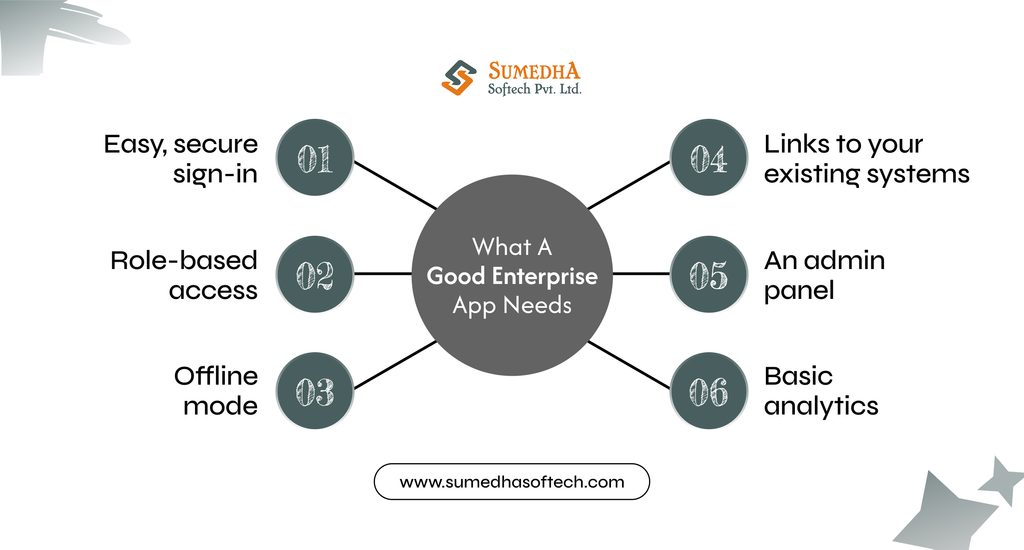
Features are where most projects tend to get out of hand, so it helps to separate what the app needs on day one from what can wait.
The Essentials for Launch
- Easy, secure sign-in
Employees shouldn’t need yet another password. Single sign-on lets them use their existing company login, and multi-factor authentication adds a second check for sensitive data.
- Role-based access
A technician, a manager, and a finance lead should each see only what they need.
- Offline mode
Field teams work in basements, warehouses, and remote sites. The app should let them keep going without signal and sync once they’re back online.
- Links to your existing systems
If the app can’t read from and write to your CRM, ERP, or HR tools, people end up entering data twice, which is one of the quickest ways to lose them.
- An admin panel
Your team should be able to add users, change permissions, and push updates without calling the developers.
- Basic analytics
You can’t tell whether the app is working unless you can see who uses it and where they get stuck.
Everything else, like chat, advanced reporting, or AI features, can wait for later releases, once real users tell you what they actually miss.
Connecting to the Systems You Already Have
This is where much of the hidden effort sits. A mobile app rarely talks to older systems directly. It usually goes through an integration layer built on APIs, which works as a go-between. That means you can add an app without replacing the ERP or CRM your teams already depend on.
Good enterprise application development treats this layer as a core part of the build, not an afterthought, because it decides how reliable the app feels in daily use. Where the app runs matters too. Cloud application development lets the backend grow as more people join and lets you roll out backend changes to everyone at once.
Speed Is Part of the Job
A slow app is an unused app. Set clear targets early, such as screens that load within a couple of seconds on a mid-range phone with a weak connection, and test against them throughout the build. Treat them as a requirement, the same way you’d treat a deadline.
Security, Compliance, and Device Management
Security is the part of a project most likely to delay a launch, so sort it out with your IT team before development starts.
Whose Phone Is It?
If the company issues phones, IT can use mobile device management (MDM) to control the whole device, including wiping it if it’s lost. If employees use their own phones, mobile application management (MAM) is the better fit. It protects only the work app and its data, so personal photos and messages stay untouched.
What Every App Should Have
- Encrypted data, on the phone and in transit.
- Single sign-on, with a second check for sensitive actions.
- Access limited to what each person’s job needs.
- A record of who opened what, and when.
- Security testing during the build, not just before launch.
Compliance
The rules depend on your industry and users. GDPR covers personal data in Europe, HIPAA covers health records in the US, and many large customers ask for SOC 2. In India, businesses are expected to comply with the DPDP Act by May 13, 2027. Raise these with your development partner in the first conversation, since changing how an app handles data later is slow and costly.
Ask Your IT Team
- Will it run on company phones, personal phones, or both?
- Which login system must it work with?
- Where can the data be stored?
Planning an enterprise mobile app?
Talk to Sumedha Softech about your app requirements, integrations, and the right approach before you start building.
The Development Process and Where You Come In
Most enterprise apps go through the same stages. You don’t need to manage each one, but a few need your input.
Discovery
The team finds out how work really happens today and what slows people down. Let them talk to the people who do the work, not only their managers.
Design
Screens are sketched and tried out before anyone writes code. Showing them to a few real users now saves a lot of rework later.
Build
Developers work in short rounds, so you get working versions to try along the way. Quick answers from you keep things moving, because waiting on decisions is one of the most common reasons projects run late.
Testing
The app is checked on real phones for bugs, speed, and security. This is also when your IT team gives its approval.
Pilot
A small group uses the app for real work for a few weeks. Listen closely to what they say, and fix the problems before more people join.
Rollout
The app reaches everyone, ideally one team at a time. Plan some training and set a date when the old way of working stops.
Support
Bug fixes, updates, and improvements carry on after launch, so keep the budget and the owner in place.
If you only remember one stage, make it the pilot. A few weeks with a small group will show you problems that are far cheaper to fix before the whole company is using the app.
What Does It Cost, and How Long Does It Take?
There’s no single price for an enterprise app. Two apps that look alike on the surface can differ several times over in cost, because what’s underneath is so different.
What Moves the Price
- Integrations: Connecting to older systems is often the biggest cost.
- User roles and screens: Every extra role and screen adds design, build, and testing time.
- Offline mode: It works well for field teams, but it takes extra effort to build.
- Security and compliance: Stricter rules mean more testing and documentation.
- Native or cross-platform: Native means building two apps.
- Team size and location: Both change the hourly cost and the speed.
Timelines follow the same logic. A simple internal tool can be ready much sooner than an app that connects to several systems, and the pilot adds a few weeks on top.
The Cost That Comes After Launch
Many first-time buyers plan only for the build. Keeping the app running with new system updates, bug fixes, security patches, and small improvements is often estimated at 15 to 25 percent of the build cost each year. Add hosting, device management licences, and staff training to that list.
Keeping the Budget Under Control
- Start with the one problem that costs you the most, and launch small.
- Choose cross-platform unless you have a real reason not to.
- Settle the scope before the build begins, because changes midway cost the most.
When you compare quotes, ask each vendor to break the estimate down by stage and list their assumptions. That’s the only way to compare like with like.
Getting People to Use It, and Proving It Was Worth It
An app only pays off once people use it. Plan for both adoption and results before launch, not in a report written afterward.
Measure Before You Launch
Write down how things work today: how long approvals take, how often data is typed in twice, how many errors or support calls come up. Without that starting point, you can’t show what changed.
After launch, keep your tracking to a short list:
- How many of the intended users open the app each week.
- How long key tasks take compared with before.
- How many errors and support requests come in.
- What users say when you ask them directly.
A Simple Way to Work Out ROI
Add up the value of time saved and mistakes avoided, take away the yearly running cost, and compare the result with what you spent. For example, if 100 field staff each save 30 minutes a day, that’s 50 hours back every day. Multiply by your average hourly cost and the number of working days, and the yearly savings are easy to see.
Helping People Actually Use It
- Choose a few respected team members as champions who can help their colleagues.
- Keep training short and based on real tasks.
- Ask for feedback in the first weeks, and let people see their suggestions get fixed.
- Switch off the old process on a set date. If both stay available, many people will drift back.
Where Enterprise Mobile Projects Go Wrong
Most failed apps don’t fail for unusual reasons. The same handful of mistakes come up again and again, and every one of them can be avoided.
- Nobody owns it: Without one accountable person, decisions stall, and adoption becomes no one’s job. Name an owner before the project starts.
- Too much at launch: A long feature list slows the build and confuses users. Launch with the essentials and add the rest when people ask for it.
- Ignoring older systems: If the app can’t connect to the tools you already use, people end up typing everything twice. Plan the integrations first.
- Skipping the pilot: A full rollout puts every problem in front of every user at once. Test with a small group first.
- Designing for the office, not the field: An app that needs perfect signal and a steady hand won’t last a week in a warehouse. Test it where people actually work.
- Leaving security for the end: Late fixes can mean reworking parts of the app. Bring IT in from day one.
Where AI Fits in Enterprise Apps
AI is showing up in more business apps, but you don’t need to add it just because it’s available. Start with one task that slows your people down today.
Some practical places to begin:
- Search and answers: Let staff ask a question and get an answer from your own documents, instead of digging through folders.
- Summaries: Turn long notes, reports, or customer histories into a few lines.
- Data entry: Fill in forms from a photo or a voice note, so field teams type less.
Before you build anything, check three things. Your data should be clean and easy to reach. People should always be able to review what the AI produces. And IT should be clear on what company information it’s allowed to see.
Start small, test it with a few users, and expand only if it saves real time.
Conclusion
A good enterprise app comes down to a few clear decisions: who owns it, how it’s built, how it stays secure, and how your people will start using it. Get those right, and the technology tends to follow.
If you’re planning an app and want a second opinion before committing, Sumedha Softech can help. We’re an enterprise mobile app development company that works alongside businesses from the first scoping conversation through build, security, rollout, and support, so you have a clear plan before you spend.
Frequently Asked Questions
1. What is enterprise mobile app development?
It’s building mobile apps that a business uses for its own work, like approvals, field updates, or order tracking. These apps usually connect to systems the company already uses.
2. How much does it cost, and how long does it take?
It depends on how many systems the app connects to, how many user roles it has, and how strict your security rules are. A simple internal tool can launch much sooner than an app that connects to several systems, and a pilot adds a few weeks. Plan for yearly upkeep too, often estimated at 15 to 25 percent of the build cost.
3. Native or cross-platform?
For most enterprise apps, cross-platform is the better start, since one codebase covers both iPhone and Android. Choose native only for heavy hardware use or demanding performance.
4. What is the difference between MDM and MAM?
MDM controls the whole device, which suits company-issued phones. MAM protects only the work app and its data, which suits personal phones.
5. How do you keep an app secure on employees’ own phones?
Use MAM to separate work and personal data, require single sign-on with a second check for sensitive actions, and encrypt stored data.
6. Custom or low-code?
Low-code suits simple internal tools. Custom makes more sense when the app is central to your operations or needs deep integration.
7. How do I measure ROI?
Record how things work before launch, then compare task time, errors, and support requests afterward. Subtract yearly running costs from the time and mistakes saved.