AWS vs Azure vs Google Cloud: Which Is Right for Your Business?
For every business, choosing between the three largest cloud computing platforms, AWS vs. Azure vs. Google Cloud, is not that simple. All three can power modern websites, enterprise systems, data platforms, APIs, containers, and increasingly sophisticated AI workloads. But the real challenge isn’t whether they can run your technology; it’s choosing the one that fits your business without adding unnecessary cost, complexity, or migration pain down the road.
The numbers back that up. Synergy Research Group’s Q2 2026 report puts global spending on cloud infrastructure services at $143 billion for the quarter, up roughly $43 billion from the same period last year. AWS held 28% of that spend, Azure held 20%, and Google Cloud climbed to a record 15% share, its highest point since Synergy started tracking the category. Together, the three hyperscalers captured 67% of the market, up from 63% just one quarter earlier.
But market share doesn’t tell you which provider is right for your company. AWS may be the better fit for businesses that value breadth and flexibility. Azure can make more sense when Microsoft technologies already underpin the organization. Google Cloud deserves serious consideration when data, AI, or cloud-native development sits at the center of the strategy.
This guide will walk through the factors that actually affect a business decision: workload requirements, total cost, AI capabilities, existing technology, team expertise, compliance, and the potential cost of changing providers later.
Why “Which Cloud Is Biggest” Is the Wrong Question
Market share is a useful context, but it is a poor decision rule. A provider can be the largest in the market without being the best fit for a particular workload, team, or business model. Here’s what the market-share numbers actually measure: how much your businesses are spending, not how well a platform fits the business spending it.
AWS holding 28% and Google Cloud climbing to 15% tells you about revenue and momentum. It tells you nothing about whether your workload, team, or budget will run better on one over the other.
Think about what “biggest” would even mean for your decision. A logistics company that is running SQL Server and Active Directory across a hundred offices does not care that AWS has the largest service catalog in the industry. A data science team building on BigQuery does not care that Azure closed more enterprise contracts last quarter.
The more useful question is not “who’s winning the cloud market.” Instead, it’s about which provider creates the least friction for how we already work, and the workloads we’re actually building. That question has a different answer for almost every business, and it’s rarely decided based on market-share ranking at all.
AWS, Azure, and Google Cloud at a Glance
Now let’s understand AWS, Azure, and Google Cloud in detail.
AWS: Built for Breadth, at the Cost of Simplicity
Amazon Web Services is the first and most widely used on-demand cloud computing platform. It runs across 39+ regions and 120+ availability zones worldwide, with a service catalog deep enough that almost any workload already has a managed AWS option built for it. Amazon Bedrock adds access to multiple foundation models, including Claude and Llama, so the team can utilize more than one AI vendor.
However, the tradeoff is complexity. With over a hundred services and layered billing models, cost management becomes its own skill, and new teams take longer to ramp up here than on a more opinionated platform.
Note—If you want maximum flexibility, global reach, and freedom from committing to a single AI provider, then AWS is the right choice for you.
Azure: Built for Businesses Already Running on Microsoft
Azure’s edge is what’s already installed on your business’s laptops. Active Directory, Microsoft 365, and SQL Server connect to it with far less setup than on a competing platform. Its AI offering, now rebranded Microsoft Foundry, has grown past OpenAI alone to include Claude, Llama, Mistral, and others, all under Microsoft’s enterprise security controls.
Outside that Microsoft-centric world, Azure shows more friction, and for equivalent workloads, its compute typically costs extra compared with AWS or Google Cloud.
Note – Go for Azure if Microsoft tools already run your operations, or you need frontier AI models with enterprise-grade compliance.
Google Cloud: Built for Data and AI-First Teams
Google Cloud’s power traces back to what Google built for itself. BigQuery for large-scale analytics, Vertex AI paired with custom TPUs for cost-efficient model training, and GKE, still the most mature managed Kubernetes service around. Its sustained-use discounts also apply automatically, with no upfront commitment required.
Therefore, the catch is scale. Google Cloud’s partner network and enterprise support are smaller than AWS’s or Microsoft’s, so complex migrations get less hand-holding here.
Note – Choose Google Cloud if your product is data- or AI-driven, and you want pricing flexibility without a multi-year commitment.
Matching the Cloud to Your Workload
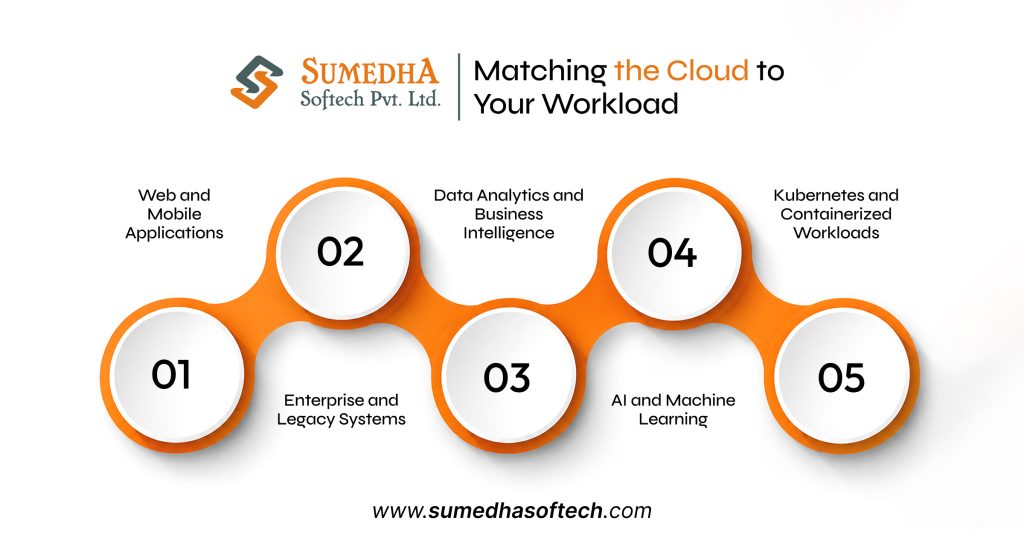
The truth is, whether you’re planning cloud app development from scratch or migrating an existing system, all three providers can technically run almost anything today, so simply picking based on features alone won’t get you far. What actually makes work here is which platform makes a specific job easier, cheaper, or faster to ship.
Web and Mobile Applications
All three handle standard web and mobile backends well. But the deciding factor varies depending on the platform. It’s usually which one our team already knows, since a familiar platform ships faster as compared to a theoretically better one.
Enterprise and Legacy Systems
If your business runs on SQL Server, Windows Server, or SAP alongside years of on-premises infrastructure, Azure’s hybrid tooling and native Microsoft integration make modernization noticeably smoother than starting from scratch elsewhere.
Data Analytics and Business Intelligence
Teams working with large, complex datasets are more likely to move faster on Google Cloud. BigQuery’s serverless design handles massive queries without the infrastructure management that similar tools on AWS or Azure often demand.
AI and Machine Learning
This is less clear-cut than it used to be. Businesses investing in AI development services have strong options across all three platforms. AWS Bedrock offers broad model flexibility, Microsoft Foundry combines frontier models with enterprise security, while Google Cloud’s Vertex AI and custom TPUs provide strong cost-performance for teams training their own models.
Kubernetes and Containerized Workloads
Google Cloud built Kubernetes, and GKE still reflects that heritage in maturity and ease of use. Whereas AWS’s EKS and Azure’s AKS have both closed much of the gap, this now comes down to which ecosystem the rest of your infrastructure already lives in.
None of these are strict rules. A business with strong in-house Kubernetes expertise might do perfectly well on AWS even for a data-heavy workload, because team fluency often matters as compared to a platform’s theoretical strength on paper.
Ready to Choose the Right Cloud Platform?
Get expert guidance on AWS, Azure, or Google Cloud based on your workload, budget, and business goals.
What Each Cloud Actually Costs You
Listing the prices here is close to useless. Because what actually decides your bill is a handful of line items most comparison charts skip entirely: data egress fees, the gap between committed and pay-as-you-go pricing, and support tiers that become mandatory once you’re running production workloads.
Meanwhile, the discount structures differ more than people expect. AWS Savings Plans can significantly reduce eligible compute costs in exchange for a one- or three-year commitment, with savings varying by the type of Savings Plan and workload. Azure offers similar savings, up to 65% off pay-as-you-go rates, through its own commitment plans. And Google Cloud takes a different approach: its sustained-use discounts apply automatically as usage grows, with no upfront commitment required, which suits businesses that can’t predict their usage a year out.
So the right question is never “which cloud is cheapest.” It’s “which one is cheapest for the architecture I’m actually going to run.” A platform that might look like an affordable option on a generic calculator can end up cheaper once you factor in your actual data patterns, and vice versa.
The 5-Question Framework to Find Your Answer
Forget rankings. These five questions will tell you more about which cloud fits your business than any comparison chart.
1. Is Microsoft already load-bearing in your business?
If Active Directory, Microsoft 365, or SQL Server run your daily operations, Azure removes friction that nothing else can.
2. Is your core product built on data or AI?
If analytics or machine learning sit at the center of what you’re building, then Google Cloud’s BigQuery and Vertex AI give you a real head start.
3. Do you need maximum flexibility?
If you want an end-to-end service catalog and no dependency on a single AI vendor, AWS remains the strongest default.
4. Do you need cost predictability, or the lowest possible price?
Committed discounts reward businesses that can forecast usage a year out. Automatic, no-commitment discounts suit businesses that can’t.
5. What does your team already know how to run?
This is the tiebreaker most guides skip. A technically ideal platform can still be the wrong choice if your engineers have to learn it from scratch while shipping production work.
What It Actually Costs to Switch Later
Almost every cloud comparison talks about picking the right platform, but none of them talk about what happens if you need to leave it.
Architectural Lock-In vs. Proprietary Lock-In
Not all cloud services trap you the same way. Portable services, like standard virtual machines, object storage, or relational databases, can move between providers with moderate effort, since the underlying concepts translate everywhere.
Proprietary managed services are a different story. Build deeply around AWS Lambda, Azure Functions, or a provider’s specific serverless and orchestration tools, and you’re not just moving data when you switch; you’re rewriting how your application works.
What’s Cheap to Move, and What Isn’t
Compute and storage are relatively affordable to migrate. Data egress fees apply, but the concepts port over cleanly. What gets expensive is everything built around a provider’s proprietary services: custom IAM setups, vendor-specific APIs, and infrastructure-as-code written for one platform’s quirks.
Add in the time it takes to retrain a team on a new provider’s tooling, and a cheaper cloud on paper can quietly cost more the moment you factor in what it takes to leave.
A platform that’s merely good enough now can beat one that’s technically superior on paper, if the second one locks you in harder. Weigh how deeply you’ll depend on a provider’s proprietary tools before you commit, not after.
One Cloud or Three? The Multi-Cloud Question
When a Single Cloud Is the Smarter Choice
One cloud is the right choice for small and mid-sized businesses. Fewer moving parts means fewer things that break. Easier billing and a smaller learning curve for a team that’s already stretched thin.
When Multi-Cloud Actually Pays Off
Multi-cloud earns its keep in specific situations: regulatory requirements that mandate data stay within certain jurisdictions, a merger that inherited infrastructure from two different providers, or a workload that genuinely performs better split across platforms, like running AI training on Google Cloud while keeping enterprise systems on Azure.
Why Multi-Cloud Isn’t an Escape from Lock-In
Here’s the part where most of the advice gets wrong: multi-cloud doesn’t remove complexity; it multiplies it. Now you’re managing two identity systems, two networking models, and two monitoring stacks instead of one. Businesses that go multi-cloud specifically to avoid lock-in often end up more locked in.
Mistakes Businesses Make When Choosing a Cloud
Most bad cloud decisions don’t come from picking the wrong provider. They come from skipping the same few steps.
- Choosing a platform based on a demo, since a polished proof-of-concept rarely reflects what production looks like at scale.
- Comparing only sticker prices and ignoring egress fees and support tiers, which can end up costing more over time.
- Ignoring what your engineers already know, and picking something technically superior that they’ll have to learn from scratch under deadline pressure.
- Treating compliance as a later problem, when data residency and security requirements are far cheaper to plan for upfront than retrofit after migration.
- Going multi-cloud to avoid a decision, which usually adds complexity instead of removing risk.
Validate Your Choice Before You Commit
Before you sign a long-term contract, it’s better to run a real test, not a generic benchmark designed to make one provider look good. Deploy the actual workload you plan to run, not a simplified version of it, and measure what matters for your business: performance, cost, engineering speed, and platform behavior when something fails.
A two-week proof of concept on your real architecture will tell you more than any comparison article. If a platform feels awkward during a small test, that friction only grows once production traffic and real deadlines are involved.
Conclusion
At last, there is no version of this comparison: AWS vs Azure vs Google Cloud. All these are capable platforms, but what decides the right fit is your existing technology, team’s expertise, workload, and how much room you want to leave yourself if your business changes direction later.
Answer the five questions in this guide honestly, and you’ll likely land on a clear direction. However, if you’re still weighing the decision, or need a team that’s already built and migrates production workloads across all three platforms, that’s exactly where Sumedha Softech comes in.
With over a decade of experience delivering cloud app development services, AI development services, and cloud computing solutions, we’ve helped teams choose the right cloud and build on it with confidence. If you’d rather talk through your specific situation than run the numbers alone, we’re happy to help you figure out what fits.
Frequently Asked Questions
1. Is AWS cheaper than Azure or Google Cloud?
Not consistently. AWS often costs more on paper, but wider discount options can lower the real bill. Google Cloud’s automatic discounts and Azure’s commitment plans can each come out cheaper depending on your actual usage pattern.
2. Which cloud is best for a small business just starting?
There’s no universal winner. Google Cloud suits unpredictable usage with no-commitment discounts, while Azure fits quickly if the business already runs on Microsoft tools like 365 or Active Directory.
3. Is Google Cloud really better for AI than AWS or Azure?
Not anymore. Model access has converged across all three. Google Cloud still leads on training cost-performance through its TPUs, but AWS and Azure now offer comparable model variety through Bedrock and Microsoft Foundry.
4. Can I switch cloud providers later without starting over?
Yes, but cost depends on what you built. Portable services like standard compute and storage move easily. Deep reliance on a provider’s proprietary tools makes switching significantly more expensive and time-consuming.
5. Do I need to use more than one cloud provider?
Most businesses don’t. Multi-cloud only earns its complexity in specific cases, like regulatory requirements or workloads that perform better split across platforms. Using it just to avoid commitment usually backfires.
6. Is Azure only worth considering for Microsoft-heavy businesses?
Largely yes. Azure’s biggest strength is native integration with Microsoft 365, Active Directory, and SQL Server. Without that existing foundation, AWS or Google Cloud usually offer more practical value.